

Domain Extraction From Emails and URLs in Text When working with large amounts of text, finding useful information hidden inside emails and web addresses can become surprisingly time-consuming. A paragraph may contain dozens of words, links, email addresses, and other details that are not immediately useful. One particularly valuable task is domain extraction from emails and URLs in text, which involves identifying website domains such as example.com from email addresses and web links.
Domain extraction sounds simple at first, but real-world text can be messy. A document might contain https://www.example.com/page, contact@example.com, www.example.com, or even several different variations of the same domain. If the goal is to build a clean list of domains, simply copying text manually is inefficient and can introduce errors. Domain Extraction From Emails and URLs in Text
Fortunately, domain extraction can be handled systematically with text-processing techniques, regular expressions, scripts, or dedicated online tools. Whether you are an SEO professional, developer, researcher, marketer, or data analyst, understanding how this process works can save considerable time and make your datasets much cleaner.
What Is Domain Extraction From Emails and URLs?
Domain extraction is the process of identifying and separating the domain portion of an email address or URL from the surrounding text. For example, if the text contains hello@example.com, the domain is example.com. Similarly, from https://www.example.com/products/shoes, the domain can generally be extracted as example.com. Domain Extraction From Emails and URLs in Text
The important point is that a domain is not the same thing as a complete URL. A URL may contain a protocol such as HTTPS, a subdomain, a path, query parameters, fragments, or other components. Domain extraction focuses on the website’s domain rather than everything that comes after it. Domain Extraction From Emails and URLs in Text
Email addresses follow a slightly different structure. In an address such as support@example.com, the part before the @ symbol is the local portion, while the part after @ is the domain. Therefore, extracting domains from emails can be as straightforward as locating the text after the final @ in a valid email address.
The process becomes more interesting when emails and URLs appear together in the same text. A single article, spreadsheet, webpage, or database record could contain dozens or thousands of them. A reliable extraction process needs to identify these patterns, remove unnecessary components, and ideally produce a clean, deduplicated domain list. Domain Extraction From Emails and URLs in Text
Why Domain Extraction Is Useful
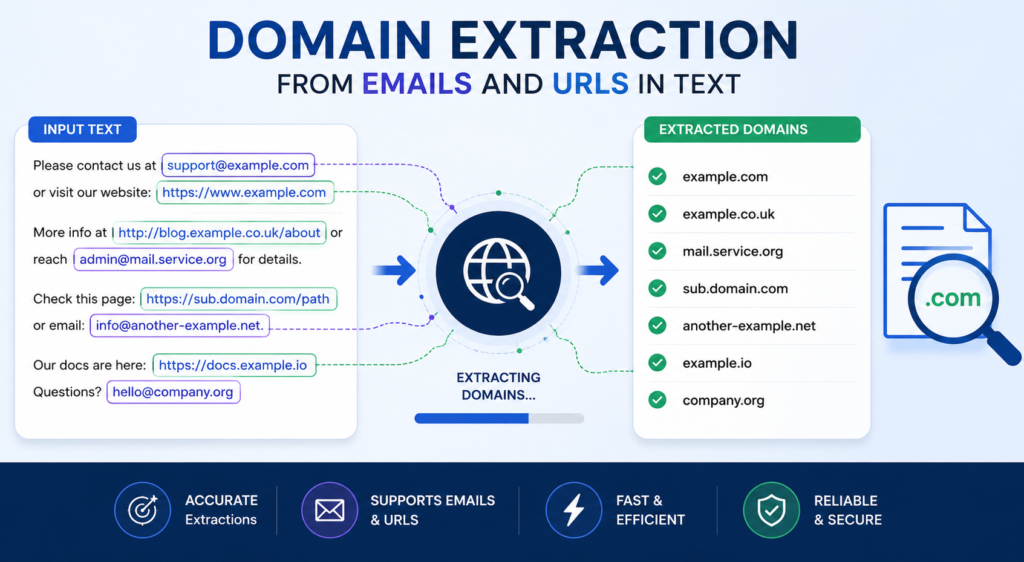
One of domain extraction from emails and URLs in text the biggest reasons people extract domains is data organization. Raw text often contains information in formats that are difficult to analyze. Turning emails and URLs into a standardized list of domains makes it much easier to sort, filter, compare, and process the information.
Domain extraction is also useful in SEO and digital marketing. For example, an SEO professional may have a large collection of websites and want to determine which domains are represented. Instead of manually inspecting every URL, a domain extraction process can quickly create a list of unique domains. This can make research, competitor analysis, backlink investigations, and website classification more efficient. Domain Extraction From Emails and URLs in Text
Another common use is data cleaning. Imagine a spreadsheet containing customer or business contact information. Some rows may include email addresses while others contain websites. Extracting domains provides a common field that can be used to group records. Several contacts from the same company, for example, can be associated with the same domain even when their individual email addresses are different. Domain Extraction From Emails and URLs in Text
Domain extraction can also help developers and analysts build automated workflows. Once domains have been extracted, they can be validated, categorized, counted, or compared with another dataset. The extraction step is often the foundation for more advanced text-processing operations. Domain Extraction From Emails and URLs in Text
Understanding the Structure of URLs
Before extracting domains from URLs, it helps to understand how a typical web address is structured. Consider an example such as https://blog.example.com/articles/topic?source=newsletter.
The https:// portion is the scheme or protocol. The next section, blog.example.com, is the host. The host may contain a subdomain, and the registrable domain is generally example.com. After the host comes the path, represented by /articles/topic, followed by a query string such as ?source=newsletter. Domain Extraction From Emails and URLs in Text
For basic domain extraction, most of these additional components are unnecessary. The goal is usually to isolate the main domain. Depending on the project, however, you may want to preserve subdomains. For example, and shop.example.com might need to be treated as separate hosts even though they belong to the same main domain.
This distinction is important because “domain” can mean slightly different things in different technical contexts. A simple extraction tool might return the complete hostname, while a more advanced system may identify the registrable domain. Knowing what your final dataset should contain will help you choose the right extraction method. Domain Extraction From Emails and URLs in Text
Extracting Domains From Email Addresses
Email addresses provide a relatively clean extraction pattern because the domain appears after the character. For example,contains the domain
A simple approach is to identify email addresses first and then split each address at the symbol. The portion on the right becomes the domain. This works well for ordinary email addresses and is easy to implement in most programming languages.
However, extracting emails from unstructured text requires more care. Text may contain punctuation immediately after an email address, such as. The period belongs to the sentence rather than the email address, so a good extraction process should avoid including it in the resulting domain. Domain Extraction From Emails and URLs in Text
There can also be multiple emails in a single paragraph, mixed with URLs and ordinary words. A reliable workflow should first identify likely email addresses, validate their general structure, and then extract their domains. This prevents random occurrences of the character from being incorrectly interpreted as email addresses.
Extracting Domains From URLs
URLs can be extracted using pattern matching or URL-parsing libraries. A URL may start with , or sometimes simply. It may also appear without a protocol, such as. Domain Extraction From Emails and URLs in Text
Once a URL has been identified, the next step is to remove components that are not part of the domain. For example from, the extraction process should recognize the host and then determine whether the desired output is or.
Using a dedicated URL parser is usually safer than relying entirely on a basic regular expression. URL parsers are designed to understand components such as schemes, ports, paths, query strings, and fragments. Regular expressions can still be useful for finding URLs within plain text, but parsing should ideally be handled separately. Domain Extraction From Emails and URLs in Text
Another challenge is punctuation. URLs in articles frequently appear next to commas, periods, parentheses, quotation marks, or other characters. An extraction process needs to distinguish the actual URL from punctuation that was added by the surrounding sentence.
Using Regular Expressions for Domain Extraction
Regular expressions, commonly called regex, are one of the most popular techniques for finding emails and URLs in text. A regex pattern can search through a large block of text and identify strings that match a particular structure. Domain Extraction From Emails and URLs in Text
For email addresses, a pattern can look for a sequence containing an @ symbol followed by a domain-like structure. Once a match is found, the domain can be captured separately or extracted afterward. This is particularly useful when processing plain text files, documents, logs, or database fields.
URL patterns can be more complicated because URLs have many possible formats. A regex might look for common protocols such as HTTP and HTTPS, optional www prefixes, domain names, and optional paths. However, trying to create one regex that perfectly recognizes every possible URL can quickly become complicated. Domain Extraction From Emails and URLs in Text
For this reason, regex is often best used as an identification tool rather than a complete URL parser. A practical workflow can use regex to locate candidate URLs and emails, followed by dedicated parsing and normalization logic. This combination tends to be more reliable than depending on one enormous regex pattern.
Domain Normalization and Cleaning
Finding domains is only part of the job. The extracted results often need to be normalized before they are useful. Without normalization, the same website may appear several times in slightly different forms. Domain Extraction From Emails and URLs in Text
For example,, and may all refer to the same primary website. If these values are placed directly into a list, they could be counted as four different entries even though they represent one domain.
Normalization can involve converting domains to lowercase, removing protocols, removing unnecessaryprefixes when appropriate, and stripping paths or query parameters. The exact rules should depend on the purpose of the dataset.
Duplicate removal is another important step. Suppose a document contains 500 links but only 120 unique domains. A deduplication process can reduce those 500 records to a clean list of 120 domains. This makes later analysis faster and easier to understand. Domain Extraction From Emails and URLs in Text
It is also worth deciding how to handle subdomains. If and are important individually, they should not automatically be reduced to. On the other hand, if the objective is to analyze organizations or websites at the primary-domain level, grouping them under may be more useful.
Common Challenges in Domain Extraction
One of the most common problems is dealing with incomplete URLs. People often write without including. A system that only searches for complete URLs beginning with a protocol may miss these domains entirely.
Another challenge is misleading text. A sentence might contain something that resembles a domain but is not actually a website. File names, technical identifiers, or ordinary words separated by periods can sometimes look like domains. A good extraction system should apply reasonable validation rules before treating a match as a real domain. Domain Extraction From Emails and URLs in Text
Internationalized domain names can create additional complexity. Not every domain consists only of simple ASCII characters. Some websites use non-Latin scripts, and their domain representations may involve internationalized domain name standards. If your project involves global data, your extraction system should account for these possibilities.
There is also the issue of tracking links and redirects. Marketing URLs may contain long query strings, tracking parameters, or redirect services. The visible URL might not represent the final website that a user eventually reaches. Basic domain extraction normally returns the domain present in the text, while determining the final destination requires a separate process. Domain Extraction From Emails and URLs in Text
Automating Domain Extraction With Scripts
For small amounts of information, an online text-processing tool may be sufficient. But when dealing with thousands or millions of records, automation becomes much more practical. A simple script can process files, database records, or large text collections without requiring manual intervention. Domain Extraction From Emails and URLs in Text
A typical automated workflow starts by reading the input text. The script identifies email addresses and URLs, extracts their domains, normalizes the results, and removes duplicates. The final output can then be saved to a CSV file, database, spreadsheet, or another format.
Python is particularly popular for this type of task because it provides powerful string-processing capabilities and libraries for handling URLs. Other languages, including JavaScript, PHP, Java, and C#, can perform the same operations using their own regular expression and URL-processing features.
Automation also makes it possible to add custom rules. For example, you might want to exclude certain domains, count how many times each domain appears, separate email domains from web domains, or group domains by top-level extension. Once the basic extraction pipeline works, these additional features can be added without changing the underlying data manually.
Best Practices for Accurate Domain Extraction
The first best practice is to define exactly what you want to extract before building the process. Decide whether the output should contain complete hostnames, registrable domains, or both. This small decision can have a major impact on the final dataset.
The second best practice is to separate detection from parsing. Finding an email or URL inside text is one problem, while understanding its individual components is another. Using specialized parsing logic after identifying candidates usually produces cleaner results.
Validation should also be part of the workflow. Not every string that looks like an email or URL is necessarily valid. Basic checks can remove obvious errors and reduce false positives. For more demanding projects, additional validation rules can be introduced based on the type of data being processed.
Finally, always test your extraction process against messy, realistic examples. Clean sample data can make a script appear perfect when it may fail on real-world content. Include punctuation, duplicate URLs, subdomains, email addresses, URLs without protocols, query parameters, and unusual formatting in your tests.
Final Thoughts on Domain Extraction From Emails and URLs in Text
Domain extraction from emails and URLs in text is a simple concept with surprisingly broad applications. At its most basic level, the task involves identifying an email or URL and isolating the domain. But reliable extraction requires attention to formatting, punctuation, subdomains, protocols, duplicates, and normalization.
For casual use, a basic extraction tool or simple script may be all that is necessary. For larger datasets, however, a structured pipeline involving detection, parsing, normalization, validation, and deduplication will produce much more dependable results.
The biggest advantage of automating the process is efficiency. Instead of manually scanning documents or spreadsheets, you can turn large volumes of unstructured text into organized domain data within seconds or minutes. This can be especially useful for SEO research, data cleaning, digital marketing, development, competitive analysis, and business intelligence.
Ultimately, the best domain extraction method depends on the quality and complexity of the source material. Start with a clear definition of what counts as a domain, choose the right extraction technique, and test it against realistic data. With those principles in place, domain extraction from emails and URLs in text becomes a practical and repeatable part of modern data processing rather than a tedious manual task.
You May Read Also:

