

What Is the URL to Add Schedules Direct If you are setting up a TV recording application, media center, or electronic program guide, you may eventually come across Schedules Direct. One of the most common questions during setup is, “What is the URL to add Schedules Direct?” This question can be confusing because Schedules Direct provides different types of data services, and the exact configuration can depend on the software you are using.
The simplest answer is that the official Schedules Direct website is schedulesdirect.org. However, entering the main website address is not always the same thing as entering a service endpoint or configuration URL inside an application. The correct setup depends on whether your software supports Schedules Direct’s XML-based SD-DD service, the newer SD-JSON service, or a built-in Schedules Direct integration.
In this guide, we will explain what Schedules Direct is, which URL you should start with, how the service works, and what to check if your application asks for a specific URL. The goal is to make the setup process easier without making it unnecessarily technical. What Is the URL to Add Schedules Direct
What Is Schedules Direct?
Schedules Direct is a nonprofit organization that provides television listing data for supported open-source and free software applications. Its service is designed to help applications display TV schedules, program information, channel listings, and related guide data. The organization says its membership fees help support open-source software projects and provide access to TV listing data. What Is the URL to Add Schedules Direct
Instead of manually entering information about every television program, compatible software can retrieve schedule information from Schedules Direct. This makes it much easier to build an electronic program guide or configure recording software.
The service has historically been used with applications such as MythTV and XMLTV, among other supported projects. Schedules Direct explains that its data can be provided through XML and JSON services, depending on the application being used. What Is the URL to Add Schedules Direct
That distinction is important because someone searching for the “Schedules Direct URL” may actually be looking for one of several different things: the official website, the login page, the API service, or an application-specific configuration address.
What Is the Official URL for Schedules Direct?
The official website for Schedules Direct is https://www.schedulesdirect.org/. This is the best starting point if you are creating an account, checking your membership, reading documentation, or looking for information about supported applications.
Official Schedules Direct website
If an application simply asks you for the Schedules Direct website or service provider and does not provide a separate API field, you should first check the application’s documentation. Some applications have Schedules Direct support built directly into their setup wizard, so you may only need your Schedules Direct account credentials rather than manually entering a URL. What Is the URL to Add Schedules Direct
The official login page is also hosted on the Schedules Direct domain. This is useful when you need to manage an account or confirm that your credentials are working before configuring another application.
Schedules Direct login page
Is the Website URL the Same as the API URL?
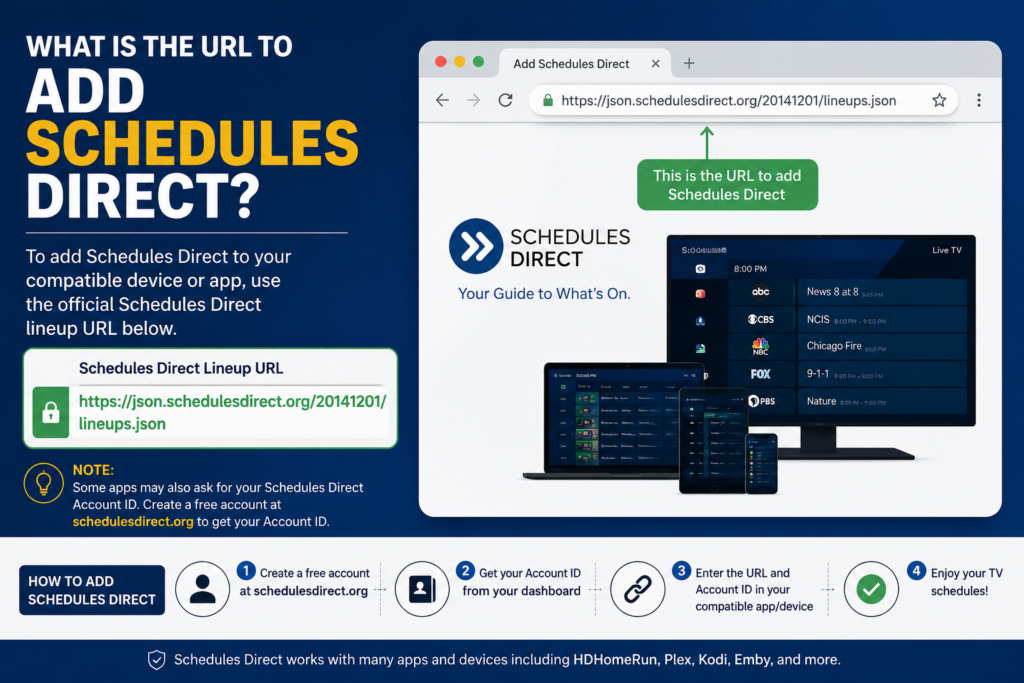
This What is the URL to add Schedules Direct is where many users get stuck. The answer is not necessarily. The Schedules Direct website and the service used by compatible applications are related, but they are not automatically interchangeable.
Schedules Direct currently provides two primary data services. The organization describes SD-DD as a legacy XML service and SD-JSON as a newer JSON-based service. The two services have different characteristics and are supported differently depending on the application you are configuring. What Is the URL to Add Schedules Direct
Therefore, if an application specifically asks for an API URL, endpoint, data service URL, or server URL, do not assume that entering the homepage address will work. The application may expect a particular endpoint or may have a dedicated Schedules Direct option.
The safest approach is to identify the exact software first. Once you know the application, you can follow its Schedules Direct configuration instructions and use the service type it supports.
What Is SD-DD?
SD-DD is the older XML-based data service offered by Schedules Direct. It is still used by some older applications and is primarily associated with television listing data for the United States and Canada. Schedules Direct describes SD-DD as a legacy service.
XML is a structured format that allows software to receive information in a predictable way. An application can process that information and turn it into a readable program guide. What Is the URL to Add Schedules Direct
If your software specifically tells you to configure an XML-based Schedules Direct service, it may be using SD-DD. In that situation, you should follow the application’s instructions rather than simply pasting the main Schedules Direct homepage into an API field.
This is especially important with older media-center software. Older applications sometimes use terminology that differs from newer documentation, so checking the software’s current setup instructions can prevent unnecessary troubleshooting. What Is the URL to Add Schedules Direct
What Is SD-JSON?
SD-JSON is the newer JSON-based service provided by Schedules Direct. According to the organization’s FAQ, SD-JSON provides roughly 20 days of schedule information, although the data farther into the future can be less certain. It also supports countries beyond the United States and Canada.
JSON is widely used in modern software because it is relatively lightweight and easy for applications to process. For that reason, newer applications may prefer SD-JSON instead of the older XML service. What Is the URL to Add Schedules Direct
Schedules Direct lists a wide range of supported regions for SD-JSON, including countries in North America, Europe, Latin America, the Caribbean, and Oceania.
If your application specifically says that it supports SD-JSON, use the configuration method recommended by that application. Do not replace a required JSON endpoint with the general Schedules Direct homepage unless the application’s documentation specifically tells you to do so. What Is the URL to Add Schedules Direct
How Do You Add Schedules Direct to an Application?
The first step is to make sure you have a Schedules Direct account. The service requires membership for access to its television listing data, and the organization currently advertises a seven-day free trial. Its current website lists a standard membership price of US$35 per year, while membership options can change, so it is worth checking the official membership page before signing up.
Schedules Direct membership information What Is the URL to Add Schedules Direct
After creating your account, you generally need to add the appropriate television lineup. A lineup tells the service what channels and programming information are relevant to your location or provider. What Is the URL to Add Schedules Direct
Your application may then ask for your Schedules Direct username and password. In some cases, the software will ask you to select Schedules Direct from a list of guide-data providers rather than manually entering a URL.
The final step is usually to download or update the guide data. If the application successfully connects to Schedules Direct, your available channels and program information should appear inside the application’s electronic program guide. What Is the URL to Add Schedules Direct
Why Does My Application Ask for a URL?
Different applications use different setup screens. One program may simply have a “Schedules Direct” provider option, while another may ask for a server address or data source.
When you see a URL field, first determine exactly what the field is asking for. Is it asking for a website? An XML service? A JSON endpoint? An API server? Or perhaps an address for a specific data provider?
These distinctions matter because entering the wrong type of address can produce an error even when your Schedules Direct account is working correctly. What Is the URL to Add Schedules Direct
If the application documentation says to enter a particular endpoint, use that endpoint exactly as documented. Avoid copying URLs from random forum posts or old tutorials because service configurations can change over time.
How to Troubleshoot a Schedules Direct URL Problem
If Schedules Direct is not working after you enter a URL, begin by checking your account. Try logging into the official Schedules Direct website directly. If you cannot log in there, the problem is probably related to your account credentials rather than your media application.
Next, check whether your application supports the Schedules Direct service you are attempting to use. Some software supports SD-JSON, while older applications may depend on SD-DD. Schedules Direct itself recommends following the procedures provided by the individual application because it does not configure most third-party applications for users. What Is the URL to Add Schedules Direct
You should also check your lineup. If the account works but channels or schedules are missing, the problem may involve the lineup rather than the URL. Schedules Direct provides a Lineup Support process for guide-data, lineup, and JSON-related problems after users log in.
What Should You Do If the URL Still Does Not Work?
If you have entered the official website address and your application still reports an error, do not immediately assume that Schedules Direct is down. The application may require a specific service endpoint instead of the homepage.
Check the application’s documentation first. Search for terms such as “Schedules Direct setup,” “SD-JSON,” “SD-DD,” “XMLTV,” or “guide data configuration.” These terms can help you find the correct setup instructions much faster.
It is also worth checking Schedules Direct’s official announcements if many users are reporting problems. The organization maintains a news archive that records service incidents, lineup problems, and other technical issues. What Is the URL to Add Schedules Direct
Schedules Direct news and announcements
Schedules Direct and XMLTV
XMLTV is another name you may encounter when configuring television guide data. Schedules Direct explains that XMLTV can be used to obtain raw XML or data in the standard XMLTV format, making it useful for applications that do not have a direct integration with every Schedules Direct service.
This can make the setup seem more complicated than it really is. There may be several components involved: your Schedules Direct account, the Schedules Direct data service, an XMLTV client, and your media application. What Is the URL to Add Schedules Direct
The important thing is to follow the software’s intended configuration path. If an application expects XMLTV output, configure the XMLTV component correctly instead of trying to force a modern JSON endpoint into an XML field.
Is Schedules Direct Available Outside the United States?
Yes. Schedules Direct’s newer SD-JSON service supports numerous countries outside the United States and Canada. Its supported-regions page lists countries across Europe, Latin America, the Caribbean, Oceania, and other areas. What Is the URL to Add Schedules Direct
However, availability does not necessarily mean that every television provider or channel will be available in every location. The quality and completeness of listings can depend on the data available for a particular region.
If you are outside the United States or Canada, SD-JSON may be especially relevant because it offers broader international support than the legacy SD-DD service.
Important Things to Remember About Schedules Direct URLs
The biggest point to remember is that the official Schedules Direct website URL is schedulesdirect.org, but that does not mean every application should use the homepage as its data-service endpoint. What Is the URL to Add Schedules Direct
Your software may have built-in Schedules Direct support, in which case you may only need your account details.
If the software asks for XML or SD-DD information, follow its specific instructions for the legacy service.
If it supports SD-JSON, use the configuration method and endpoint specified by the software’s documentation.
Finally, always prefer current information from Schedules Direct or the application developer over old setup guides. Schedules Direct continues to maintain its services, and its website currently documents both SD-DD and SD-JSON.
Final Thoughts
So, what is the URL to add Schedules Direct? If you simply need the official website, the answer is https://www.schedulesdirect.org/. That is the main Schedules Direct website where you can create or manage an account, review membership information, and access official resources.
However, if you are configuring Schedules Direct inside a media application, the answer can be more specific. The application may require an SD-DD XML service, an SD-JSON service, or no manually entered URL at all. This is why knowing the exact application is more important than simply finding a URL through a search engine.
For the most reliable setup, start with the official Schedules Direct website, verify your account, identify which data service your application supports, and then follow the application’s current configuration instructions. Taking those few steps can save you from many of the common connection and guide-data problems that users encounter during setup.
You May Read Also: 3PL New Warehouse Expanding 2026

